Nekopara Sekai Connect How to Redeem Present Codes
Exact in-game path from the café home screen to a successful Receive.
Before you redeem anything
Nekopara Sekai Connect (Nekoconne) uses an in-game Present Code field rather than a separate browser redeem portal. That keeps rewards tied to the account you are playing, which is great for security and annoying if you accidentally redeem on a guest or unlinked client.
Do this first:
- Update the client (Steam, iOS, or Android) so menu labels match current builds.
- Finish the short tutorial if you are brand new — some menu entries unlock after the opening sequence.
- If you own both mobile and Steam saves, link them with Data Transfer → Link via ID & Password before spending codes. Linking is covered in the Steam launch guide.
- Confirm the code itself came from nekoconne.com, @nekoconne_en, or another official post — not a random aggregator. Active strings we trust (including smile2026, c108, and smilefest2026) are listed on the Codes Hub.
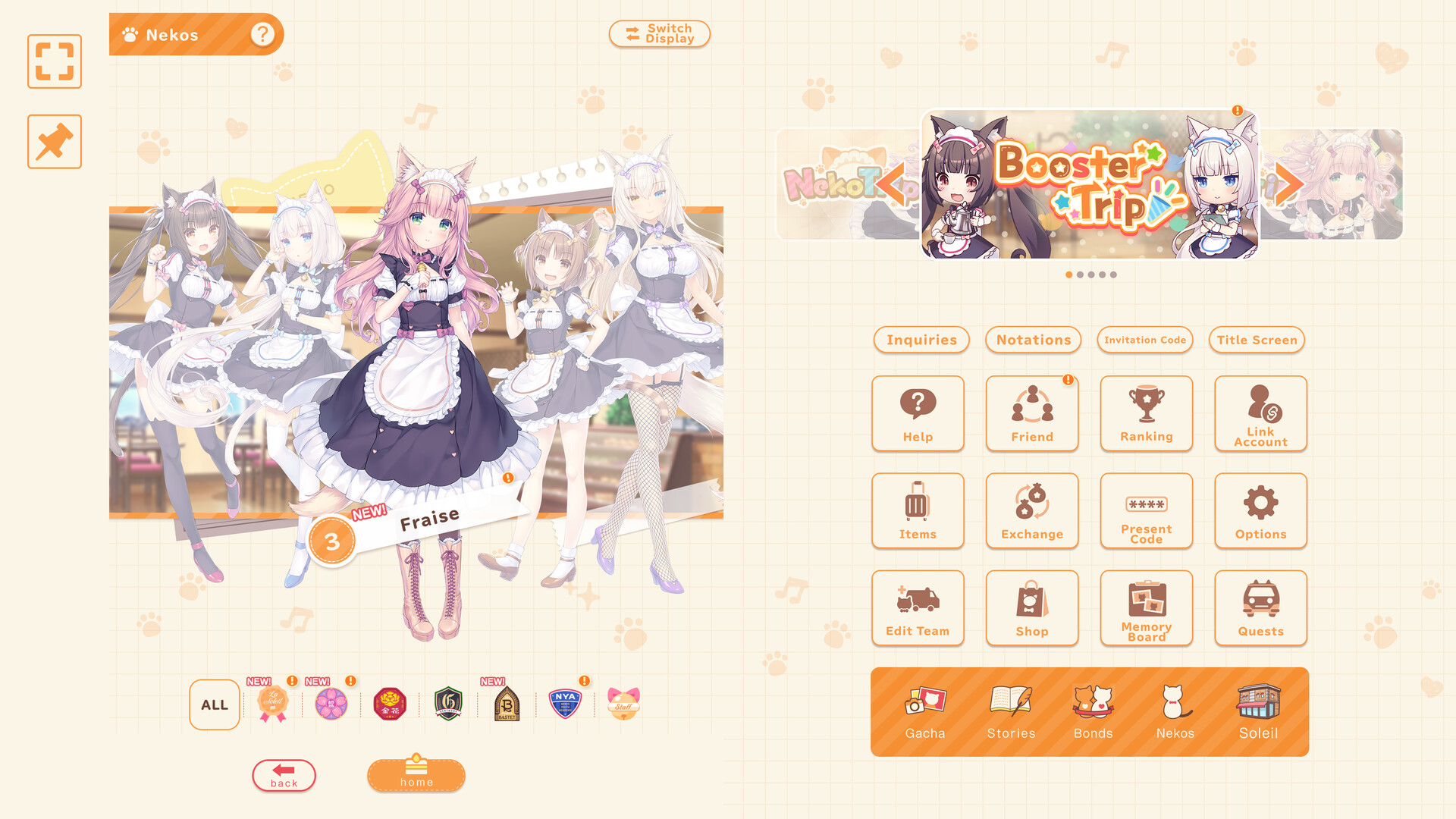
Step-by-step: Avatar / menu → Present Code → Receive
- Log in and reach the main café / home screen (La Soleil hub).
- Tap your Avatar or the Menu entry that opens account and system options. On some layouts this is the player icon in a corner; on others it sits inside a hamburger-style menu.
- Inside that panel, look for Present Code or Present Codes. Official English posts use that exact wording.
- Open the Present Code window. You should see a text field and a confirmation control labeled Receive (or the localized equivalent).
- Paste the code. Prefer paste over typing — Present Codes mix letters and digits and are case-sensitive.
- Double-check there are no spaces before or after the string.
- Tap Receive.
- Read the result toast. Success usually mentions tickets or items granted; failures show expired, already used, or invalid messages.
- Open your mailbox / present box immediately. Some campaigns drop rewards there instead of dumping straight into inventory.
That is the entire loop. There is no separate web form for standard Present Codes, and you should not enter account passwords on unofficial “code generator” sites.
Tips that prevent failed redeems
- One account, one redeem. Codes are generally single-use per account. Linked Steam + mobile shares that limit — redeem once after linking, not once per platform.
- Case sensitivity.
smile2026is not the same asSmile2026if the official post used lowercase. - Language pack quirks. If your UI is Japanese or Chinese, the menu label still maps to the same Present Code feature; follow iconography if the translation differs slightly.
- Maintenance windows. During patch downtime the redeem API can reject valid codes. Wait for servers to reopen, then try again.
- Screenshot successes. If Support asks for proof, a toast screenshot plus the code string helps.
- Do not chain fake codes. Spamming invented strings from farms will not unlock secret pity; it only wastes time. Stick to the Codes Hub table.
What rewards look like after a good redeem
Verified presents so far lean toward Neko Gacha Tickets and Neko Trip Tickets, sometimes with small material packs. Tickets feed the gacha banner you actually care about — for Steam launch season that may include Jasmine’s rate-up — while trip tickets support exploration / outing style content depending on the current build. Neither replaces café progression: Customer Service, Level + Limit Break/Awakening, and Garden/Flower levels still dominate rating. After redeeming, park leftover tickets until you read the Tier List and Nekos notes.
Steam players should also remember that the login bonus up to 130 Gacha Tickets (Nov 18–Dec 8 2026 PST) is not entered as a Present Code. You claim it by logging in on the correct days. Limited missions through November 30 are likewise mission-track rewards. Present Code is the occasional extra on top of those campaigns.
Troubleshooting common errors
“Invalid code” / no reward
- Re-copy from the official post; avoid OCR from screenshots.
- Remove spaces and line breaks.
- Confirm you are on the live production client, not a leftover beta build.
- Check whether the code’s published expiry (often JST) has already passed.
“Already received” / already used
- You (or a linked device) already claimed it. Check the present box history.
- If you created a second Steam account by mistake, switch back to the linked main account.
Menu has no Present Code entry
- Finish the tutorial and any forced update dialogue.
- Relog after a patch that reorganizes the avatar menu.
- Confirm your language pack finished downloading; incomplete localization can hide entries until restart.
Rewards missing from inventory
- Open mailbox / present box and claim manually.
- Restart the client once; inventory caches sometimes lag after redeem.
- If still missing, gather screenshots and use official Support / FAQ channels linked from the Links Hub.
Redeemed on the wrong platform save
- Stop spending resources on the orphan save.
- Follow Data Transfer → Link via ID & Password as described in Steam launch.
- Future codes should be redeemed only after you confirm the home screen shows your real café progress.
Mobile vs Steam checklist
| Step | Mobile | Steam |
|---|---|---|
| Update client | Store update | Steam verify integrity if menus look stale |
| Link account | Create ID & Password, then link | Enter the same ID & Password under Data Transfer |
| Open Present Code | Avatar/Menu → Present Code | Same path on PC UI |
| Claim launch login | Mobile login days still count if linked | Required for the Nov–Dec ticket track |
| After redeem | Check present box | Check present box |
Aftercare: spend smart, not fast
Once tickets land:
- Mark today’s login on the Daily Checklist.
- Skim banner dates on Updates so you do not pull the day before a rate-up ends.
- Review roles — Powerful / Buffer / Debuffer / Extra — and elements Pop / Passion / Sweets on the Nekos hub.
- Return to Getting Started if you still need café and rating fundamentals.
Present Code is a convenience feature, not a progression skip. Use it, verify the source, claim the mailbox, and get back to La Soleil service, garden care, and festival prep.
Quick reference
Path: Avatar / Menu → Present Code → paste → Receive → mailbox.
Trust: Official site + official X only; see Codes Hub for the live verified table.
Not a code: Steam login ticket campaign and limited missions — claim by playing, not by pasting.
Frequently Asked Questions
Quick answers to the most common questions.
What is the exact Present Code menu path?
From the café home screen open Avatar/Menu → Present Code → paste the string → tap Receive, then check your mailbox/present box.
Why did my code say invalid?
Usually a typo, leading space, expired JST window, or a fake aggregator string. Re-copy from official X or the Codes Hub and try again after maintenance.
Can I redeem the same code on mobile and Steam?
Codes are per account. Link with Data Transfer → Link via ID & Password first, then redeem once on the shared save. Details in Steam launch.
Do I enter the 130 Gacha Ticket login bonus as a Present Code?
No. That Steam launch reward is claimed by logging in between November 18 and December 8, 2026 (PST). Present Code is a separate gift-string system.
Where should I report a missing reward?
Use official Support / GOOD SMILE FAQ channels listed on the Links Hub, and include screenshots of the Receive toast plus your linked account ID details (never share passwords publicly).